Play Game 3D Text Effect: Boost Your Design Workflow
In the fast-paced world of digital design, time is a valuable asset. Whether you're creating promotional materials for a client or personal projects to showcase your creativity, having tools that streamline your workflow can make all the difference. The Play Game 3D Text Effect offers just that—a ready-to-use Photoshop template that allows you to generate stunning 3D text visuals without the need for complex installations or advanced technical skills. This article explores how this template can benefit your creative process and deliver professional results quickly.
What Is Play Game 3D Text Effect?
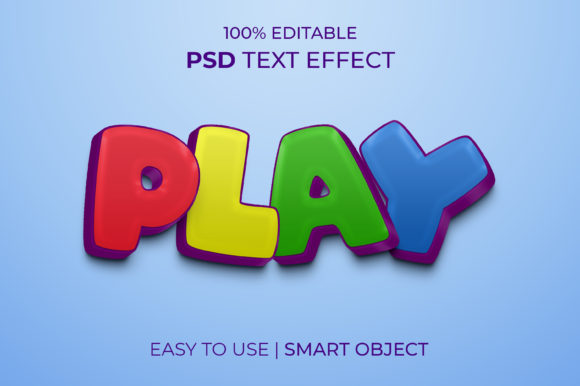
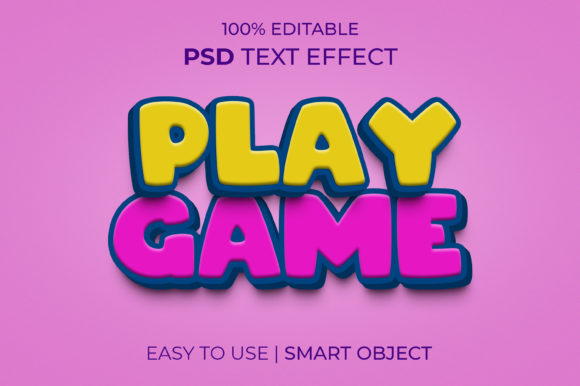
The Play Game 3D Text Effect is a pre-designed Photoshop (.PSD) file featuring a vibrant 3D text layout with the word "PLAY GAME." It's crafted to be fully customizable through smart objects, meaning you don't have to install any additional plugins or software. You simply open the file in Photoshop, replace the existing text in the smart object layer, and voilà—you get a high-quality 3D effect tailored to your needs.
This resource is particularly useful for designers who want to add depth and dimension to their text-based projects without investing hours into learning 3D modeling techniques or using external tools. Its clean organization, RGB color mode, and generous canvas size (2000x1331px) ensure compatibility and clarity across different platforms and print/digital mediums.
Why Use a 3D Text Effect Template?
Designers often face the challenge of balancing quality with efficiency. A well-crafted 3D text effect can elevate the visual appeal of your work, but building one from scratch typically requires expertise in lighting, shading, and layer effects. The Play Game 3D Text Effect removes these barriers by providing a polished, editable template that you can use right away.
- Time-Saving: Instead of manually adjusting layers and experimenting with lighting, you can focus on content creation while the template handles the visual complexity.
- Creative Flexibility: With smart objects, you can change the text, font, and colors without disrupting the overall design structure.
- Consistent Quality: The layered structure ensures that every element stays sharp and aligned, maintaining a professional look regardless of the platform where it’s displayed.
Who Can Benefit From This Template?
This tool is ideal for a wide range of professionals and creatives. For instance:
- Marketing Professionals: Need eye-catching banners or social media posts for game-related promotions? This template gives you an instant head start.
- Freelance Graphic Designers: Looking to expand your portfolio with dynamic text effects? Use this template to create consistent, high-quality designs for clients.
- Bloggers and Content Creators: Enhance your blog headers or YouTube thumbnails with a modern 3D text style that stands out.
- Game Developers: Create compelling titles for game launch announcements or tournament posters with minimal effort.
Each of these users can leverage the Play Game 3D Text Effect Template to produce visually striking content faster than ever before.
Real-World Applications and Use Cases
Imagine you're launching a new mobile game and need promotional assets in a rush. Rather than spending hours trying to perfect a 3D text effect, you can download the Play Game 3D Text Effect template and customize it within minutes. Replace the default text with your game title, tweak the colors to match your branding, and export it for web or print use.
Another example could be a small business owner promoting a weekend gaming event at their arcade. Using this template, they can design engaging posters and digital ads that capture attention and convey excitement effectively. The RGB color mode ensures the vibrancy looks great on screens, while the large resolution supports both online and offline use.
Even educators might find value in this template when designing interactive presentations or classroom decorations related to technology, art, or games. The organized layers allow them to modify the design easily and integrate it into larger slides or infographics.
How to Get the Most Out of the Template
To maximize the utility of the Play Game 3D Text Effect, consider the following tips:
- Use Compatible Fonts: While the template includes a free font, if you choose to replace it, make sure the font you select is readable and complements the 3D effect.
- Experiment with Color Themes: Since the template uses smart objects, you can easily apply brand-specific color schemes or seasonal themes to keep your content fresh and relevant.
- Leverage Layer Groups: The well-organized layers help you understand how each part of the 3D effect was built, giving you the freedom to tweak elements like shadows, highlights, or background textures.
By taking advantage of the template’s structure, you can not only speed up your workflow but also deepen your understanding of how 3D text effects are constructed in Photoshop. This knowledge can empower you to create variations or even build your own custom templates in the future.
Limitations and Considerations
While the Play Game 3D Text Effect is highly functional and user-friendly, it’s important to recognize its limitations. The template provides a specific style of 3D text effect, so if you need something drastically different—like metallic textures, neon lighting, or extruded shapes—you may still need to explore other options or invest some time in customizing further.
Additionally, since it’s a Photoshop-exclusive file format (.PSD), those who don’t have access to Adobe Photoshop won’t be able to edit it directly. However, the final output can be exported to common image formats like PNG or JPEG, making it accessible for sharing or printing.
If you’re working on a project that demands multiple unique 3D styles, it might be beneficial to compare this template with others available online. But for many users, especially those under tight deadlines, the Play Game 3D Text Effect strikes the perfect balance between customization and convenience.
Encouraging Feedback and Community Growth
One of the key aspects of the Play Game 3D Text Effect is the designer’s emphasis on community feedback. By encouraging users to “Please Rate me 5 Star,” they’re fostering a culture of appreciation and constructive engagement. Positive feedback not only validates the creator’s efforts but also inspires them to develop more high-quality resources in the future.
As a designer or user, leaving thoughtful reviews helps maintain a healthy ecosystem where creators continue to innovate and improve their offerings. It also ensures that reliable, well-made templates remain visible to others who might benefit from them.
Conclusion
The Play Game 3D Text Effect is more than just a design file—it's a practical solution for anyone looking to enhance their projects with professional-grade 3D text effects. Whether you're a marketer needing quick promotional graphics, a blogger wanting to stand out, or a hobbyist exploring new design techniques, this template delivers real value with minimal effort.
Its smart object integration, layered structure, and RGB color mode make it versatile and easy to adapt for various purposes. While it may not replace full 3D modeling software for complex tasks, it excels in situations where time and simplicity are critical factors.
So next time you need to add a bold, three-dimensional statement to your design, remember that the Play Game 3D Text Effect is there to simplify the process. And if you find it helpful, consider supporting the creator with a positive review. After all, the more we appreciate quality work, the more of it we’ll see in the future.