How to Use the GAME Editable 3D Text Effect in Photoshop
Creating stunning visual content has never been easier, especially with tools like the GAME Editable 3D Text Effect. This powerful resource is ideal for designers, marketers, and creative professionals who want to elevate their text-based projects without diving into complex 3D modeling. Whether you're designing a logo, promotional banner, or social media graphic, this effect adds depth and dimension that can make your message stand out.
What Is the GAME Editable 3D Text Effect?
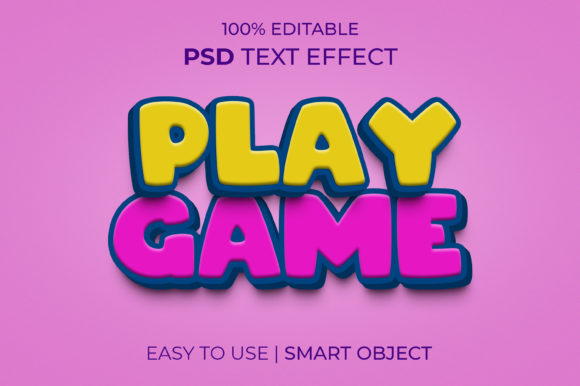
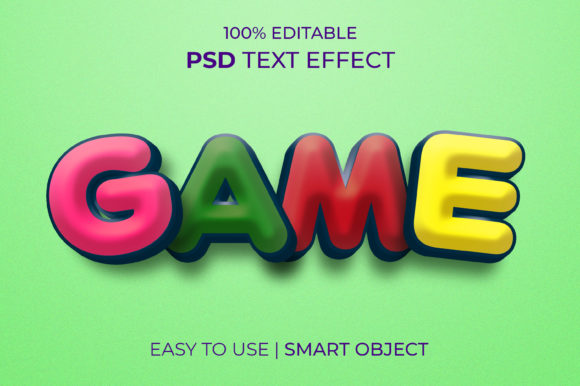
The GAME Editable 3d Text Effect is a Photoshop template designed to give users an easy way to apply high-quality 3D effects to any text. Unlike traditional methods that require plugins or advanced knowledge of 3D software, this template uses smart objects to let you customize everything from font style to color — all within Adobe Photoshop itself.
Why It’s Useful for Designers and Content Creators
For many creators, time is a precious resource. The GAME 3D TEXT EFFECT TEMPLATE eliminates the need to learn new software or spend hours adjusting lighting and shadows. You can open the file, replace the existing text, and instantly get professional results. This makes it perfect for:
- Graphic design projects
- Social media posts
- Website headers and banners
- Game title screens
- Product packaging and branding
Its intuitive setup allows both beginners and seasoned designers to achieve impressive visuals quickly and efficiently.
Key Features of the GAME 3D Text Effect Template
Here are some standout features that make the GAME Editable 3d Text Effect a valuable asset in your creative toolkit:
- Smart Objects Enabled: Simply double-click the smart object layer to edit your text. No need to recreate the entire effect every time.
- Fully Editable Elements: From colors to lighting, almost every aspect of the design can be modified to suit your vision.
- High Resolution (2000 x 1331px): Ensures crisp and clear output suitable for print or digital use.
- RGB Color Mode: Optimized for screen display, making it great for web and mobile applications.
- Organized Layers: The PSD file is well-structured with grouped layers for easy navigation and editing.
- Includes Free Font: So you don’t have to worry about missing typefaces when opening the design.
Who Can Benefit from Using It?
This template is particularly beneficial for individuals and businesses working on:
- Marketing Campaigns: Standout headlines and taglines that catch attention.
- Web Design: Creating engaging headers and call-to-action sections.
- Game Development: Title screens or in-game UI elements that feel dynamic and immersive.
- Print Media: Posters, flyers, and brochures where bold typography is essential.
Real-World Applications and Examples
Let’s look at how the GAME 3D Text Effect can be applied in different scenarios:
1. Social Media Graphics
Business owners often rely on eye-catching graphics to boost engagement. With this template, they can create 3D text effects for announcements, product launches, or event promotions. For example, a gaming store could use the effect to promote a sale with “Huge Game Sale – Up to 50% Off!” styled in a bold, dimensional format that draws the viewer’s eye.
2. Website Headers
Websites need strong visual anchors to guide users. A designer might use the GAME Editable 3d Text Effect to craft a hero section for a tech blog titled “Innovate. Create. Play.” with a futuristic 3D look that complements the blog's theme.
3. Poster Design
Event posters often benefit from dramatic typography. Imagine a music festival using this template to stylize the name of the event in 3D — the result would be visually striking and highly memorable.
4. Branding Projects
When launching a new brand or rebranding an existing one, having a unique and impactful logo is key. The 3D text effect offers a fresh take on branding elements, allowing you to experiment with depth and perspective before finalizing a design.
Strengths and Practical Considerations
The biggest strength of the GAME 3D TEXT EFFECT TEMPLATE is its accessibility. Because it doesn't require installing additional plugins, it lowers the barrier to entry for those who aren’t familiar with 3D rendering. It also maintains flexibility, letting you tweak fonts, colors, and effects without compromising quality.
However, there are a few things to keep in mind when using it:
- While the template is editable, some advanced 3D customization may still require external software if you want to go beyond what's offered.
- Ensure your system meets Photoshop requirements to handle large PSD files smoothly.
- Some effects may not render perfectly on all devices or platforms, so always test your final output across multiple screens.
Despite these considerations, the overall ease of use and quick turnaround make it a popular choice among creatives looking for efficiency without sacrificing quality.
How to Evaluate If It’s Right for Your Project
Before downloading the GAME Editable 3d Text Effect, ask yourself a few questions to determine if it aligns with your needs:
- Do I need a 3D text effect quickly without learning complicated tools?
- Is my project primarily digital or print-based? (The RGB mode is best suited for digital displays.)
- Am I comfortable working with layered Photoshop files?
- Will the included font work with my design, or do I need something more custom?
If you answered yes to most of these, then the template is likely a good fit. On the other hand, if you’re working on a highly customized 3D model with specific textures or materials, you might need more advanced software like Blender or Cinema 4D.
Getting Started: A Quick Guide
Using the GAME 3D TEXT EFFECT TEMPLATE is straightforward. Here’s a basic workflow:
- Download the PSD file and open it in Photoshop.
- Locate the smart object layer containing the default text.
- Double-click the smart object to enter editing mode.
- Type your desired text and choose a font (the free font is already embedded).
- Close the smart object and preview the changes in the main document.
- Adjust colors, lighting, or positioning as needed using the available layers.
- Export the final design in your preferred format for use in print or online.
This process ensures you maintain the integrity of the original 3D effect while personalizing it for your specific message or brand.
Limitations and What to Expect
Although the template is versatile, it does have some limitations. Since it’s pre-built, it may not offer the same level of control as creating a 3D model from scratch. You won’t be able to adjust every angle or shadow manually, but for most casual and semi-professional uses, the built-in options are sufficient.
Additionally, while the included font is free and compatible, it may not be the best choice for every design. If you prefer to use a premium font, make sure it's installed on your system before replacing the smart object text.
Where to Find and Download the Template
The GAME Editable 3d Text Effect is typically available through design marketplaces or creative resource sites. When searching, look for the full description stating that no plugins are required and that the file includes everything you need to start editing right away. Always ensure the file is properly organized and labeled, which will help streamline your workflow.
Encouraging Quality Feedback
If you find the GAME 3D TEXT EFFECT TEMPLATE helpful in your work, consider leaving a rating. Many designers appreciate knowing their work impacts others positively. A simple 5-star review can encourage the creator to continue producing useful and inspiring resources for the community. Not only does it support them, but it also helps others discover quality tools faster.
Final Thoughts
In today’s fast-paced digital world, having tools that simplify the creative process is invaluable. The GAME Editable 3d Text Effect provides just that — a seamless way to add 3D flair to your designs without the hassle of learning new software or spending hours on adjustments. Whether you're a professional designer or someone just starting out, this template can enhance your productivity and creativity.
By understanding its features, limitations, and real-world uses, you can make informed decisions about whether it suits your current project. And remember, sharing feedback through ratings can help improve the availability of such tools for everyone in the future.