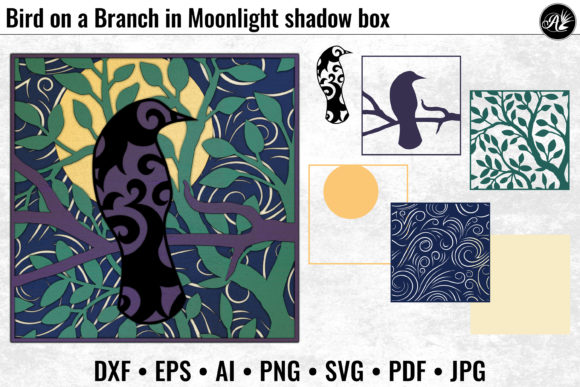
Bird on a Branch in Moonlight: A Modern 3D Wall Art Design for Creative Projects
The Bird on a Branch in Moonlight design is more than just an artistic image—it’s a versatile and scalable digital asset that blends the tranquility of nature with the iconic swirling patterns of Van Gogh's The Starry Night. This 3D wall art piece captures a serene scene where a bird rests on a branch, illuminated by the soft glow of a low-hanging moon. The intricate details and layered composition make it ideal for laser cutting, engraving, and crafting applications across a range of materials and formats.
Understanding the Design Elements
The Bird on a Branch in Moonlight features six clearly labeled layers (01 to 06), plus an optional spacer layer for added depth or framing needs. Each layer contributes to the overall visual impact, whether you're using this for shadow box framing, signage, or decorative panels. The background swirls echo the dreamy, celestial style of The Starry Night, while the foreground elements—bird, branch, and moon—are rendered with precision for clean lines and detailed textures.
This design is optimized for compatibility with various software and hardware platforms. You'll receive it in multiple file formats including DXF, AI, EPS, PDF, PNG, JPG, and SVG, ensuring flexibility for both vector-based and raster-based workflows. The PNG and JPG files are set at 300 dpi for high-resolution printing or display purposes, while vector files allow for scaling without loss of quality.
Where Does This Fit in Your Workflow?
Whether you're an artist, educator, entrepreneur, or hobbyist, integrating the Bird on a Branch in Moonlight into your creative process can enhance the final output of your projects. Here's how it fits into different stages:
- Before a project: Use this design as inspiration during the ideation phase. Its aesthetic can guide color schemes, material choices, or even help visualize the mood of a larger work.
- During production: As a ready-to-use file, it streamlines the creation process when working with laser cutters like Glowforge, Cricut, ScanNCut, or Silhouette. It eliminates the need to manually create or adjust complex shapes and textures.
- After completion: Incorporate it into finished products such as greeting cards, home decor items, or educational materials. It serves as a polished visual element that adds artistic value quickly and efficiently.
Compatibility and Practical Implementation
To ensure seamless integration, consider the following practical tips:
- Choose the right format: If you’re working with a laser cutter or engraver, prioritize vector files like DXF, AI, EPS, or SVG. These formats preserve detail and scalability. For printed outputs or displays, PNG and JPG offer excellent clarity at 300 dpi.
- Scale with caution: While the vector files can be scaled up or down, avoid reducing the size below 6 inches due to thin parts in the design. Maintaining proper scale ensures structural integrity and visual appeal, especially when using materials like wood or acrylic.
- Use labeled layers effectively: The six layers are designed to build the scene progressively. Start from layer 01 (top) and move downward. If you're using a shadow box frame, you may need to adjust the overall size to fit within standard insert dimensions.
- Material selection matters: If you plan to print this design onto paper for a framed piece, use a minimum of 65 lb cardstock or heavier to prevent warping and ensure durability. For laser-cutting, test on scrap material first to determine optimal settings based on thickness and type.
Integration with Other Tools and Resources
The beauty of the Bird on a Branch in Moonlight lies in its adaptability. You can combine it with other assets or tools depending on your goals:
- Design software: Import the AI or EPS file into Adobe Illustrator or Inkscape to modify colors, add text, or integrate it into a larger layout.
- Prototyping tools: Use the DXF format with CAD programs to plan mounting options or create templates for custom frames or stands.
- Marketing content: Bloggers and marketers can embed the JPG or PNG versions into website headers, social media posts, or promotional materials to evoke a sense of calm and creativity.
- Teaching aids: Educators can use the layered structure to demonstrate design principles, layer management, or the intersection of art and technology in classroom activities.
Workflow Examples and Use Cases
Here are a few real-world scenarios where the Bird on a Branch in Moonlight design can be implemented:
Home Decor Project
A small business owner specializing in handcrafted wall art could use this design as part of a seasonal collection. By importing the SVG into their Silhouette machine, they can produce multiple copies with consistent quality. Pairing the design with natural wood finishes enhances the organic feel of the scene, making it a perfect fit for modern farmhouse or bohemian interiors.
Custom Framed Print
For a more traditional approach, artists might choose to print the JPG or PNG version on high-quality canvas or fine art paper. After printing, they can mount it into a floating frame or a shadow box, using the preview image as a reference to align each layer correctly. This method allows for a tactile experience while preserving the visual depth of the original artwork.
Educational Craft Kit
An educator creating a STEM-based art lesson could incorporate this design into a kit that teaches students about layering, perspective, and the use of digital tools in crafts. The labeled layers provide an easy way to introduce concepts like hierarchy and composition, while the vector format makes it simple to print and cut with classroom-grade equipment.
Event Branding
Marketers planning a wellness retreat or eco-friendly event might use this design as part of their branding. The calming imagery can be embedded into posters, signage, or even custom apparel via heat transfer vinyl. Its recognizable style helps reinforce a theme of peace and connection to nature.
Factors to Consider When Using This Design
When incorporating the Bird on a Branch in Moonlight into your workflow, keep these factors in mind to maintain efficiency and quality:
- Preparation: Always review the design before starting a cut or print job. Check alignment, layer order, and file integrity to avoid errors mid-process.
- Organization: Store the different file types in clearly labeled folders. Keep a backup of the combined file for quick access, and separate individual layers if customization is required later.
- Quality control: Test cuts or prints are essential. They help identify potential issues with line weight, spacing, or resolution early on, saving time and materials.
- Long-term use: If you're producing multiple units, establish a standardized workflow to maintain consistency. Document your preferred settings and layer arrangements for future reference.
Enhancing Efficiency and Consistency
One of the key advantages of this design is how it supports efficient and repeatable outcomes. Because all major laser and cutting machines recognize the provided file formats, there's minimal setup time needed once you've configured your initial parameters. This is particularly valuable for creators who manage multiple orders or batches of similar designs.
Consistency is also easier to achieve when working with pre-labeled layers. Whether you're assembling shadow boxes or engraving multiple pieces, the same base file can be used across all units, reducing the risk of misalignment or visual inconsistencies. Additionally, the inclusion of a completed preview helps users visualize the end result and make informed adjustments before committing to a full production run.
Conclusion
The Bird on a Branch in Moonlight design offers a unique blend of artistic expression and technical precision. It's not only a visually appealing piece but also a functional asset that integrates smoothly into a variety of creative and professional workflows. From home decor to educational kits, from marketing collateral to custom gifts, this 3D wall art design adapts to meet diverse needs while maintaining its core charm.
By understanding the components, preparing properly, and leveraging the right tools, users can maximize the potential of this design and bring their ideas to life with confidence and clarity.